
1win Registration – Create Your Account in India
Registration on our platform takes only a couple of minutes and unlocks immediate access to all main sections: Sports, Casino, Free Money, Markets, Live Casino, and Poker. Once registered, new users from India can activate a lucrative welcome bonus package of up to +600% on cryptocurrency deposits, with rewards reaching up to ₹191,000 INR.
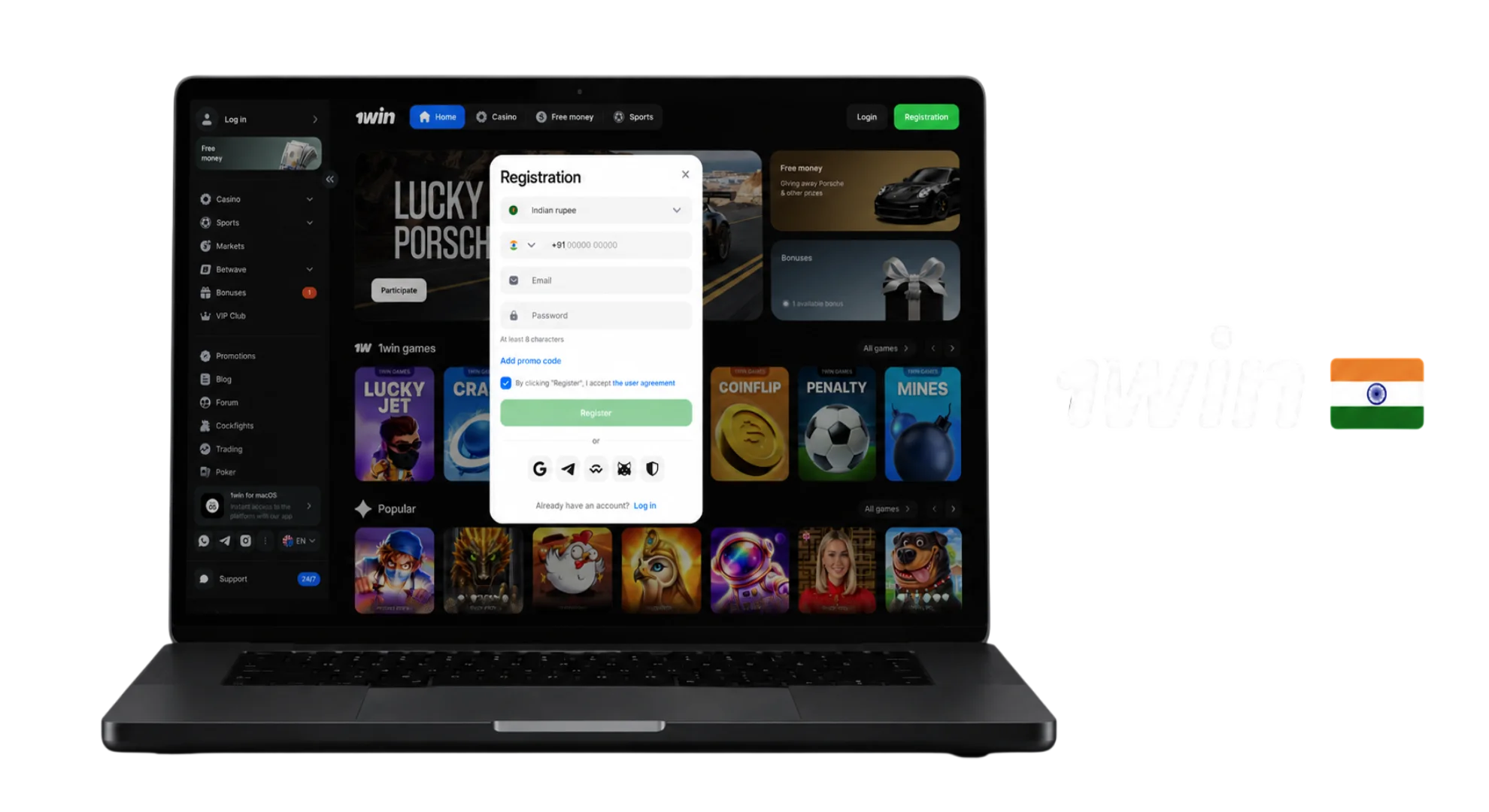
How to Register on 1win?
Creating an account on 1win website is fast, streamlined, and secure. The registration procedure requires only a few basic steps whether you are using a desktop computer or a mobile device.
Open the Registration Form
To start creating your profile, click the Registration button. This primary action button is located at the top of the page in the website header, as well as lower down.
Choose a Registration Method
Select your preferred account creation option inside the registration pop-up window. You can complete a quick registration using your phone number and email address, or authorize instantly via social networks and Web3 crypto wallets.
Fill in Your Details
Provide your active contact details. Enter your valid phone number and email address, select Indian Rupee (INR) as your preferred account currency, and create a strong password to protect your account.
Enter a Promo Code
If you have an active promotional code, click the + Promo Code field in the registration window. Entering your code during account creation ensures your welcome bonus package is automatically applied to your profile.
Confirm Your Registration
Review your information and complete the account creation process by clicking the Register or Sign Up button. This button is positioned inside the form, in the website header, and further down in the quick-action panels.
Choose Your Registration Method
We provide multiple sign-up methods so every user in India can choose the option that best suits their preferences.
Register by Phone Number
Registering by phone number is ideal for mobile users who want fast account access. You receive instant SMS notifications, quick security updates, and simple password recovery directly to your mobile device.
Register by Email
Choosing email registration is recommended for users who prefer comprehensive account control. This method simplifies receiving account statements, transaction notifications, security alerts, and official platform news.
One-Click Registration via Social Networks
For instant setup, you can link your existing social media accounts (such as Google, Telegram, or Steam) or Web3 cryptocurrency wallets (like MetaMask or Trust Wallet). Your profile details sync automatically in one click.
Regardless of the registration method you choose, your account receives identical functionality, full access to all betting and gaming sections, identical security protections, and equal bonus eligibility.
Welcome Bonus After Registration
Upon completing registration, new players from India can claim 1win welcome bonus package. When funding your account in Indian Rupees (INR), your first deposit earns a 130% bonus up to ₹47,750 INR. The overall bonus package extends across your first four deposits (up to ₹191,000 INR.), offering up to +600% for cryptocurrency deposits, alongside additional 500 free spins for top online casino slots.
Complete Your Profile Verification
Account verification (KYC) protects user funds, prevents fraudulent activity, and complies with international gambling standards. To verify your profile, follow these steps:
- Log in and open the Settings tab within your account profile.
- Fill in all required personal information fields (full name, date of birth, country of residence) accurately as shown on your official identification documents.
- Verify your email address and phone number by entering the verification codes sent to your contact information.
- Upload a clear photo or color scan of a valid ID document (Aadhaar Card, PAN Card, or Passport) through the security request section or upon request from customer support.
- Provide proof of address (utility bill or bank statement issued within the last three months) if requested by the security department.
Common Registration Problems and Solutions
If you encounter any issues while creating your profile, refer to the troubleshooting table below for instant solutions:
| Problem | Potential Cause | Solution |
| SMS verification code not received | Mobile network delay or incorrect phone number format | Double-check your phone number entry, wait 2 minutes, or request a re-sent code. |
| Email already registered | An account already exists under this email address | Use the password recovery link under the sign-in form or log in with your original credentials. |
| Promo code not working | Typo in the code or expired promotion | Check letter casing, copy and paste the code carefully, and apply it before completing registration. |
| Registration button unclickable | Missing required fields or browser cache error | Fill out all highlighted fields, refresh the page, or clear your browser cache. |
Registration on Mobile Devices
Creating an account on smartphones and tablets is fully optimized for touchscreens and offers the complete functionality of our platform. You can register directly through our responsive mobile web version in any browser without downloading extra software.
If you prefer dedicated applications, Android users can install 1win APK file directly from our platform. For iPhone and iPad users, we provide a lightweight iOS Web Application (PWA). Keep in mind that real-money gambling apps are not distributed through Google Play or the Apple App Store due to store policies, so always use our direct installation options.
FAQ
How to delete 1win account?
To close or permanently delete your account, contact our 24/7 customer support team via live chat or email at [email protected]. You can also request temporary self-exclusion in accordance with our Responsible Gaming policies.
Can I use a promo code during registration?
Yes. Click the + Promo Code field inside the registration form and enter your active code before clicking the final Register button.
Is phone verification required to create a 1win account?
Initial registration takes only seconds and does not require immediate phone verification. However, confirming your phone number in your profile settings is required before making your first withdrawal.
Can I register through the 1win mobile app?
Yes. The registration process on our Android APK app and iOS PWA application is completely identical to the desktop version.
What should I do if I don’t receive the verification code?
Check your phone network signal, verify that your email spam folder is empty, and wait 2 minutes. If the code still does not arrive, click re-send or contact our 24/7 live chat support.
Updated: